Installation
Prerequisite
On Windows
To have dowloaded QGIS from the official website and installed it following the installation guide.
Open QGIS.
On Linux
To have dowloaded QGIS from the official website and installed it following the installation guide.
To have downloaded the file containing the list of dependencies: https://gitlab.com/elan7835313/elan/-/blob/main/requirements/development.txt.
To use Elan on Linux, you must have a virtual environnement containing the required dependencies.
The procedure explained is to be done only once.
1. Create a Python virtual environment.
$ python3 -m venv --system-site-packages ~/.venvs/elan
2. Activate this environment.
$ source elan-test/bin/activate
3. Install dependencies using the file containing the list of dependencies.
$ pip install -r /path/development.txt
Attention
Replace path in the code line with the path to the file containing the list of dependencies that you downloaded earlier.
4. Open QGIS in Python virtual environment using the terminal.
$ qgis
To use Elan on Linux, you will always need to launch QGIS from the virtual environment. Therefore, each time you will need to:
Activate the virtual environment.
Open QGIS using the terminal.
$ source elan-test/bin/activate
$ qgis
On Mac
Currently, Elan is not compatible with Mac.
Installing plugin
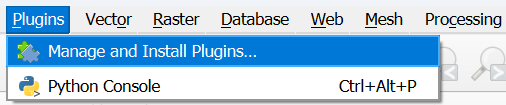
1. Open the plugin manager.
2. In All (landmark 1), search “elan” (landmark 2). Select the plugin (landmark 3) and click on Install plugin at the bottom of the plugin description (landmark 4).
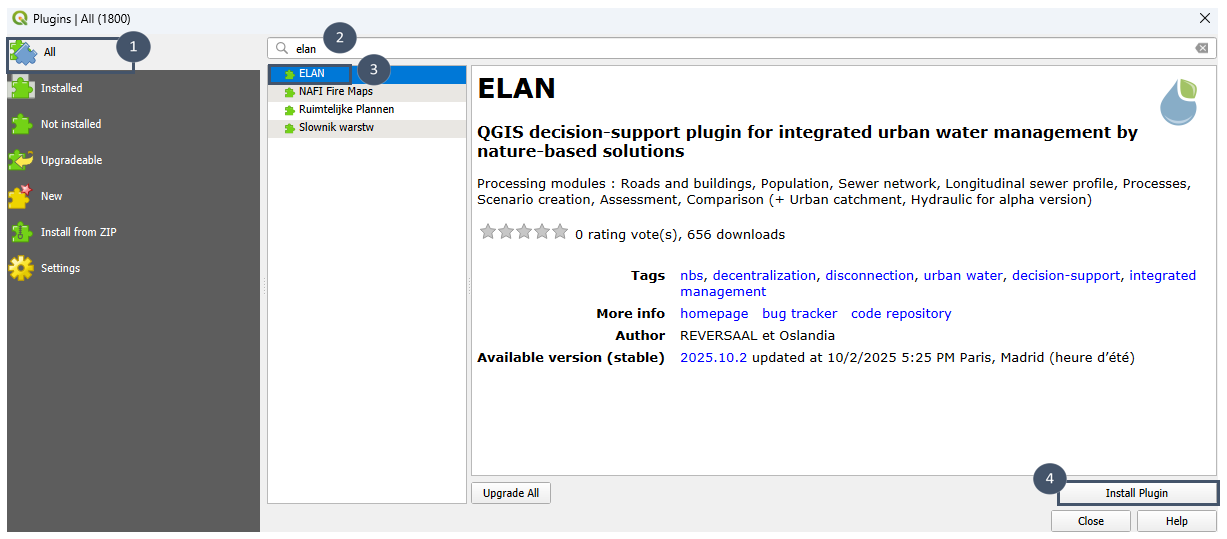
3. The message Plugin installed successfully appears at the top of the window. Close the plugin manager.
Note
The plugin is under development. When a new version is available, proceed as above but click on Upgrade at the bottom of the description.
Attention
Once the plugin upgraded, you need to reinstall external dependencies as detailed in the following section.
Installing external dependencies
Elan uses codes developed as part of various research projects (see introduction). This section explains how to install them. Depending on the code, installation is done either via the plugin settings or directly from the command line.
Centralized/decentralized question: pysewer and wetlandoptimizer
pysewer is a Python library developed by UFZ, a German research center focused on environmental research.
It enables the design and preliminary sizing of a separate sewer network. For more details:
Sanne et al., (2024). Pysewer: A Python Library for Sewer Network Generation in Data Scarce Regions. Journal of Open Source Software, 9(104), 6430, https://doi.org/10.21105/joss.06430
GitLab link : https://git.ufz.de/despot/pysewer
Its installation is done via the plugin.
Important
pysewer is required to use the Sewer network module.
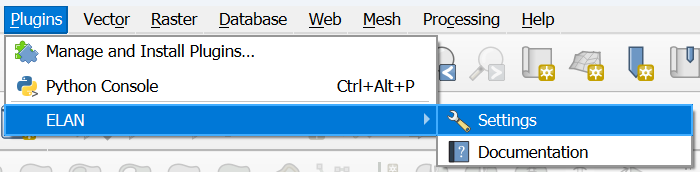
1. Go to the Elan plugin settings.
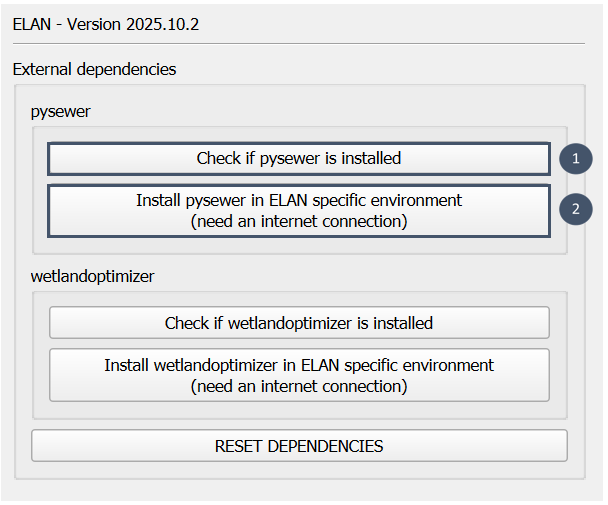
2. Check whether pysewer is already installed by clicking Check if pysewer is installed.
3. If not, proceed with installation using the button Install pysewer in Elan specific environment (need an internet connection).
wetlandoptimizer is a Python package developed by REVERSAAL (INRAE) as part of the CARIBSAN project.
It enables optimized preliminary sizing for constructed wetland treatment systems. These systems can be single-stage or multi-stage and made of different processes. For more details:
Its installation is done via Elan.
Important
wetlandoptimizer is required for the Processes module to work.
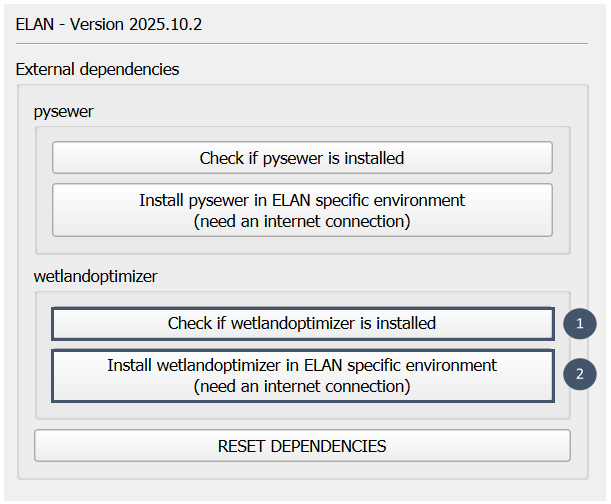
1. Go to the Elan plugin settings.
2. Check whether wetlandoptimizer is already installed by clicking Check if wetlandoptimizer is installed.
3. If not, proceed with installation using the button Install wetlandoptimizer in Elan specific environment (need an internet connection).
Note
Installing a dependency via the plugin can take several minutes, this is normal. No information window appears but the process runs correctly in the background. Once installation done, a window appear stating Installation successfull.
Note
Dependencies may be subject to version upgrades. In such cases, perform RESET SETTINGS and then reinstall the dependencies as explained above.
When a new version of Elan is installed, pysewer and wetlandoptimizer should also be reinstalled.
Stormwater overflows question: pysheds
pysheds is an open-source Python library developed by UT Austin, a U.S. university (Texas).
It allows rapid delineation of topographic catchments by analyzing a Digital Elevation Model (DEM). Its installation is done directly from the command line.
Important
pysheds must be installed to use the Urban Catchment module.
1. Open a terminal. For example, on Windows open the OSGeo4W Shell application.
2. Run the following command:
pip install pysheds
3. Close the terminal.
Installing the third-party QGIS plugins
Some Elan features rely on third-party QGIS plugins. This section specifies which ones and how to install them.
Centralized/decentralized question: Data Plotly
Data Plotly is a QGIS plugin that allows the creation of interactive plots in QGIS environment. It is based on the Plotly library and the Python API. Data Plotly gathers a large community and evolves thanks to its contributions. The development of Elan provided an opportunity to contribute to Data Plotly by adding a new type of plot : the radar plot.
GitLab link : https://github.com/ghtmtt/DataPlotly
Its installation is done via the QGIS plugin manager.
Important
Data Plotly is required to be able to view the Processes outputs graphically.
1. Open the plugin manager.
2. In All (landmark 1), search “Data Plotly” (landmark 2). Select the plugin (landmark 3) and click on Install plugin at the bottom of the plugin description (landmark 4).
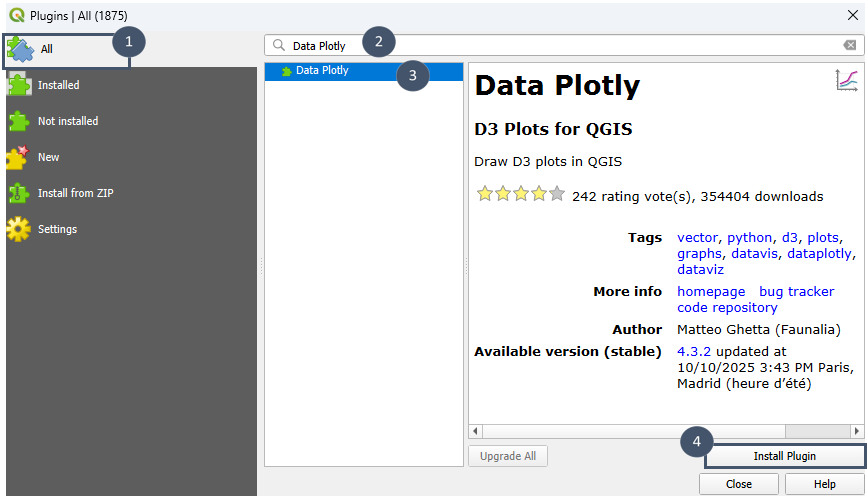
3. The message Plugin installed successfully appears at the top of the window. Close the plugin manager.